
Current Plan
The Billing page shows your currently active plan, what's included, your billing cycle, and the next renewal date and amount.
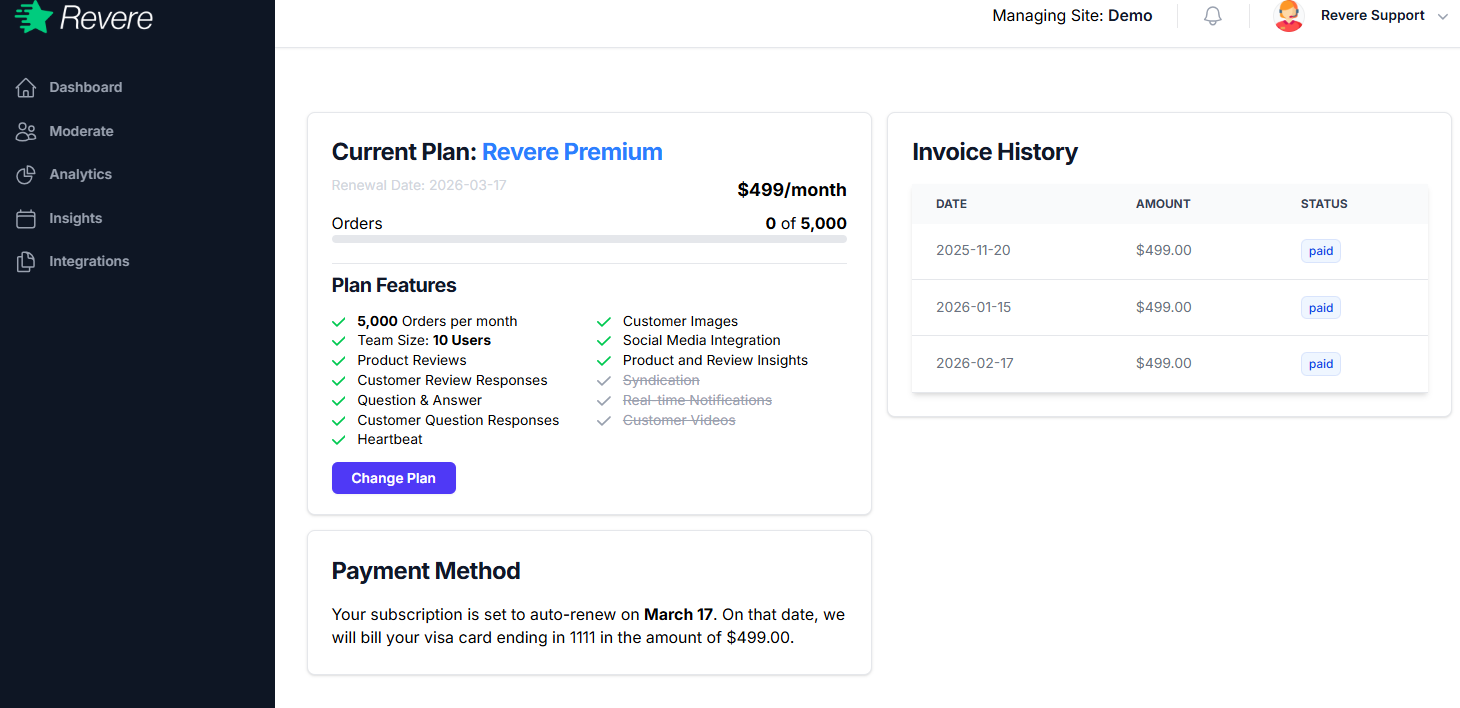
The plan summary shows:
- Plan name and monthly price
- Order volume included per month
- Features included in your plan tier
- Next renewal date and amount
Plan Features
Revere Premium includes:
Changing Your Plan
To upgrade, downgrade, or cancel your plan, click Change Plan on the Billing page. You'll see the available plan options and their pricing.
Plan changes take effect immediately. If you upgrade, you'll be charged a prorated amount for the remainder of the current billing period. If you downgrade, the new pricing applies at your next renewal date.
Invoice History
The Invoice History table on the right side of the Billing page shows all past charges. Each row displays:
- Invoice date
- Amount charged
- Payment status (Paid / Pending / Failed)
Click any row to download a PDF invoice for your accounting records.
Payment Method
The Payment Method section shows the credit card currently on file. Your subscription auto-renews on the billing date shown, and the card on file will be charged automatically.
To update your card, click Update payment method and enter your new card details. Changes take effect immediately for the next billing cycle.
If a payment fails, Revere will retry up to 3 times over 7 days. If all retries fail, your account may be suspended until payment is resolved. Make sure your card details are kept up to date to avoid interruptions.