
Overview
Moderation Settings determine whether submitted reviews are held for manual approval or published automatically, and what automatic filters are applied.
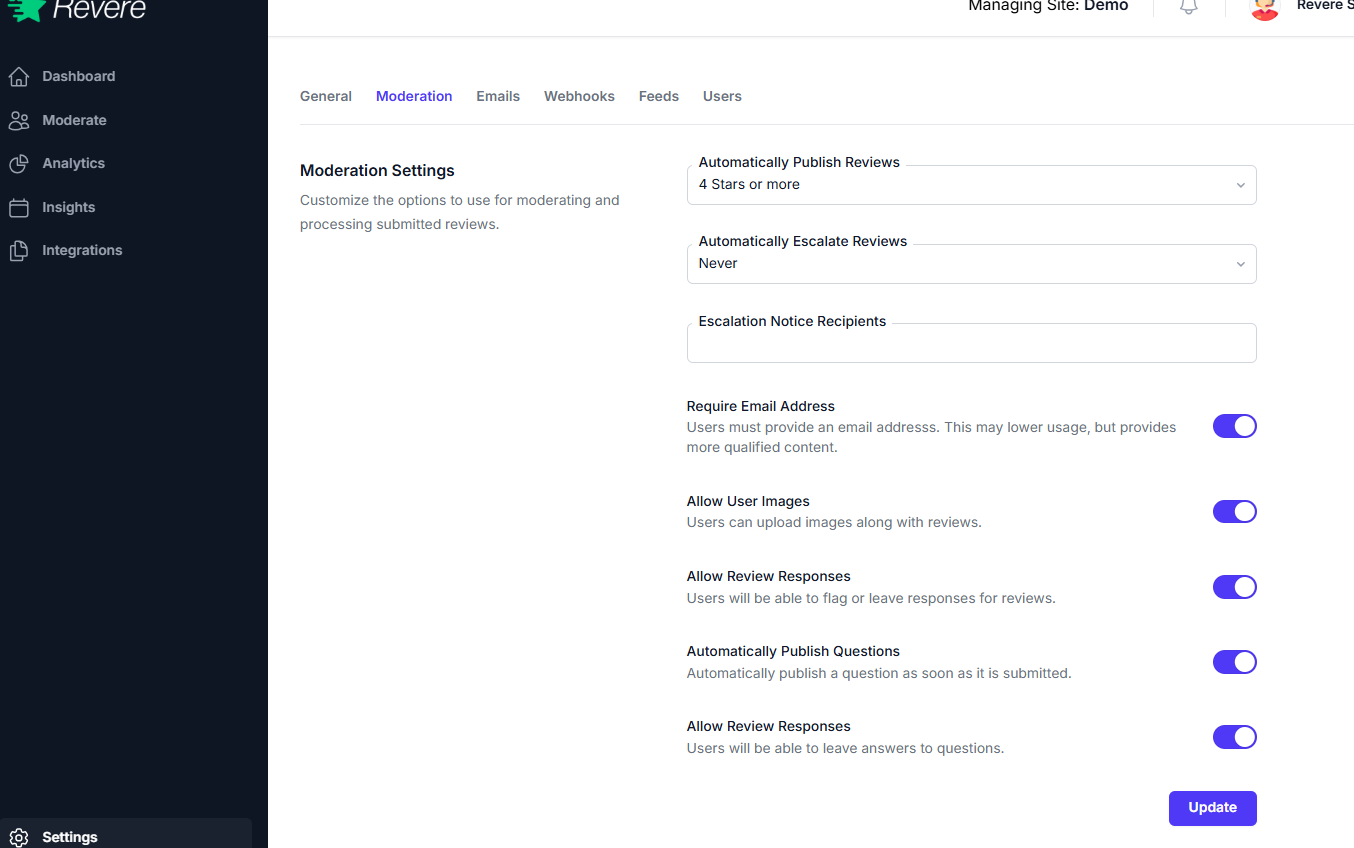
Auto-Publish
When auto-publish is enabled, reviews that pass your configured filters are immediately made public without requiring manual approval. This is useful for high-volume stores that can't review every submission individually.
Consider carefully: Enabling auto-publish means negative reviews can appear on your store immediately. Make sure your profanity filter and minimum rating thresholds are configured before turning this on.
When auto-publish is off (manual moderation), all reviews sit in the pending queue until you approve or reject them from the Moderation → Reviews page.
Content Filters
Profanity Filter
When enabled, reviews containing profanity are automatically flagged and held for manual review, even when auto-publish is active. This prevents offensive language from appearing publicly.
Minimum Star Rating
Optionally set a minimum star rating required for a review to auto-publish. For example, setting this to 3 stars means 1 and 2-star reviews are always held for manual review. (Not recommended for most stores — authentic negative feedback builds trust.)
Minimum Review Length
Require reviews to contain a minimum number of characters before they can be published. This prevents low-effort one-word reviews from appearing on product pages.
Q&A Settings
The same auto-publish and filter settings can be applied independently to Q&A content, giving you separate control over how questions are moderated versus reviews.